What AppSource compliance requires
AppSourceCop is the code analyser built into the AL Language extension for Visual Studio Code. It enforces the mandatory naming affix, the object ID range assigned to you, obsolete-state discipline and breaking-change protection — and an extension that does not satisfy it will not be published.
This guide takes apart a real extension rather than describing a pattern in the abstract. Shipment Notes & Sales Control solves two ordinary problems: logistics teams need shipment tracking that does not depend on posting, and finance needs a way to stop an incomplete sales order from posting at all. The source is on GitHub, linked above.
The engineering decisions are the point. Where validation lives, how posting is intercepted without touching base objects, how errors stay translatable, and what the tests assert — each of those is a choice that either survives the next Business Central update or does not.
Key Business Value & Features
| Capability | Business Impact | Technical Implementation |
|---|---|---|
| Advanced Logistics Tracking | Independent shipment note lifecycle (Draft → Pending → Approved → Released). | Custom XYZ Shipment Note entity with table-level state transition rules. |
| Sales Order Quality Control | Prevents accidental posting of unverified sales orders. | Event subscriber listening to Sales-Post.OnBeforePostSalesDoc. |
| Automated Document Series | Auto-generates clean, sequential document numbers. | Integrated with standard Codeunit "No. Series". |
| Enterprise Readiness | Zero compiler warnings, 100% AppSource compliance. | Strict affix matching (XYZ), assigned ID ranges (70000000+), and XLIFF localization. |
1. AppSource Compliance & Metadata Configuration
Building cloud-ready extensions for Microsoft AppSource requires strict adherence to code analysis rules, object ID allocations, and naming conventions.
- Assigned ID Range:
70000000to70000999 - Mandatory Affix:
XYZ(enforced viaAppSourceCop.json) - Target Baseline:
Cloud(BC 24.0+) - Localization Feature: Enabled
TranslationFileinapp.jsonfor XLIFF translation generation.
AppSourceCop.json
app.json (Excerpt)
2. Feature Deep Dive: Advanced Shipment Notes & State Validation
Logistics teams require structured document lifecycles to prevent premature release of warehouse instructions. The extension introduces the XYZ Shipment Note table (70000001) paired with the XYZ Shipment Note Status Enum (70000000).
Status Enum Definition (XYZShipmentNoteStatus.Enum.al)
State Transition Rule Enforcement (XYZShipmentNote.Table.al)
To prevent users from bypassing review stages (e.g., jumping directly from Draft to Released), validation logic is embedded directly within the field’s OnValidate() trigger:
3. Feature Deep Dive: Event-Driven Sales Posting Control
Instead of modifying standard Business Central source code, modern AL development relies on event subscribers.
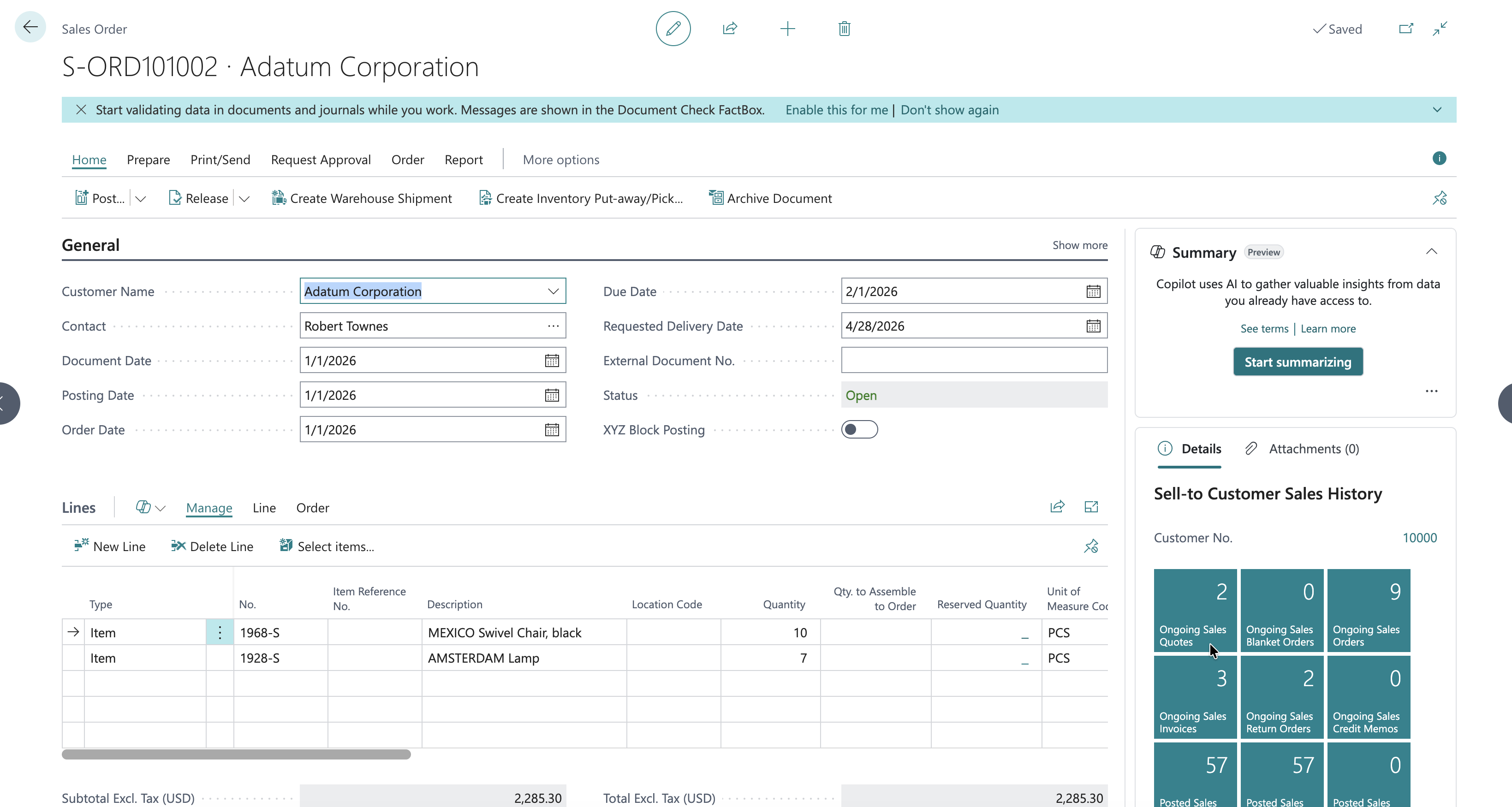
The extension extends the standard Sales Header table and Sales Order page to introduce a manual XYZ Block Posting switch. When enabled, an event subscriber intercepts Sales-Post execution.
Table & Page Extensions
Event Subscriber (XYZSalesPostingEventSub.Codeunit.al)
4. Enterprise Security & Translatable Localization
Explicit Permission Set (XYZPermissions.permissionset.al)
To adhere to modern Business Central security guidelines, an explicit Assignable = true permission set grants controlled RMID and execution rights across all custom objects:
Translatable Labels & XLIFF Localization
All hardcoded messages were converted into AL Label variables containing translator comments, ensuring clean auto-generation of XLIFF translation manifests (Shipment Notes & Sales Control.g.xlf).
5. Automated Unit Testing & Robust Assertions
Relying on empty asserterror blocks in automated test suites can lead to false positives (e.g., catching unrelated setup errors).
Data Daur built a dedicated assertion helper codeunit (XYZLibraryAssert.Codeunit.al) and an automated test suite (XYZTestSalesBlock.Codeunit.al).
End-to-End Operational User Guide
Below is the step-by-step procedure for administrators and logistics coordinators to configure and utilize the extension in Business Central.
Step 1: Initial Setup & Number Series Assignment
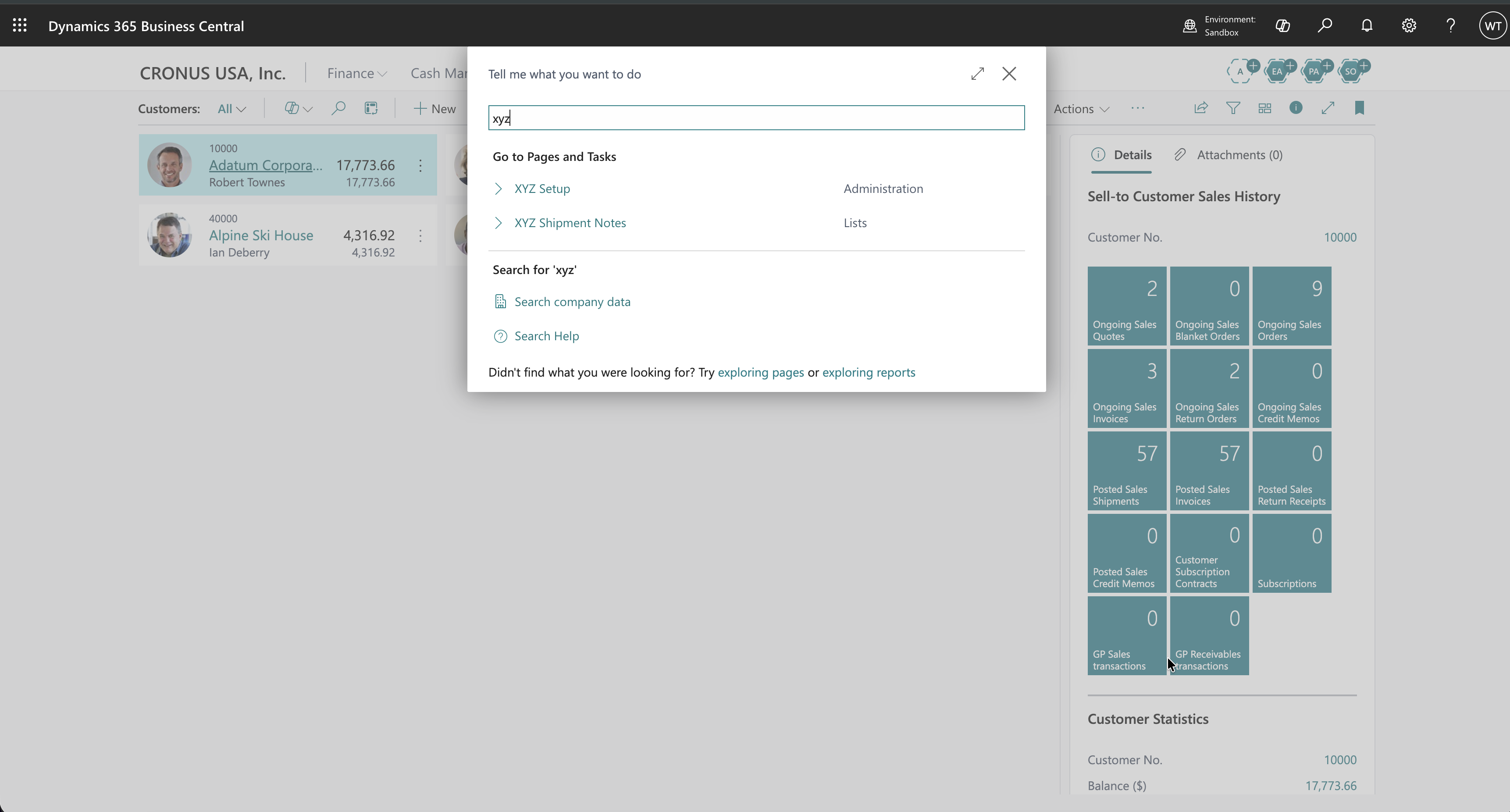
- Open Business Central and press Alt + Q (Tell Me search).
- Type XYZ Setup and open the
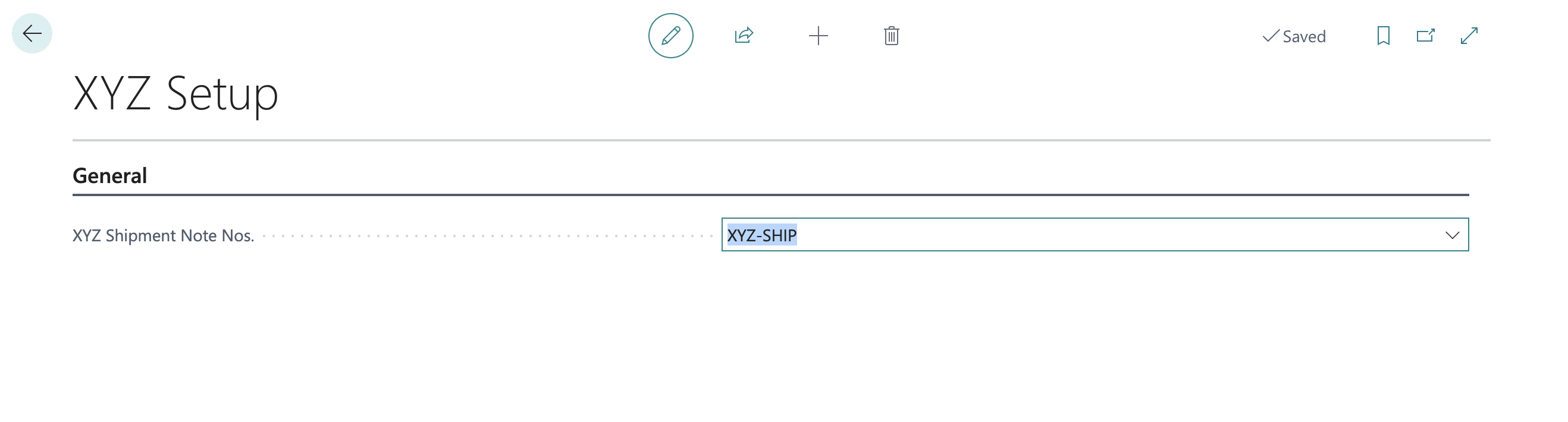
XYZ Setup Card. - Under the General FastTab, locate XYZ Shipment Note Nos..
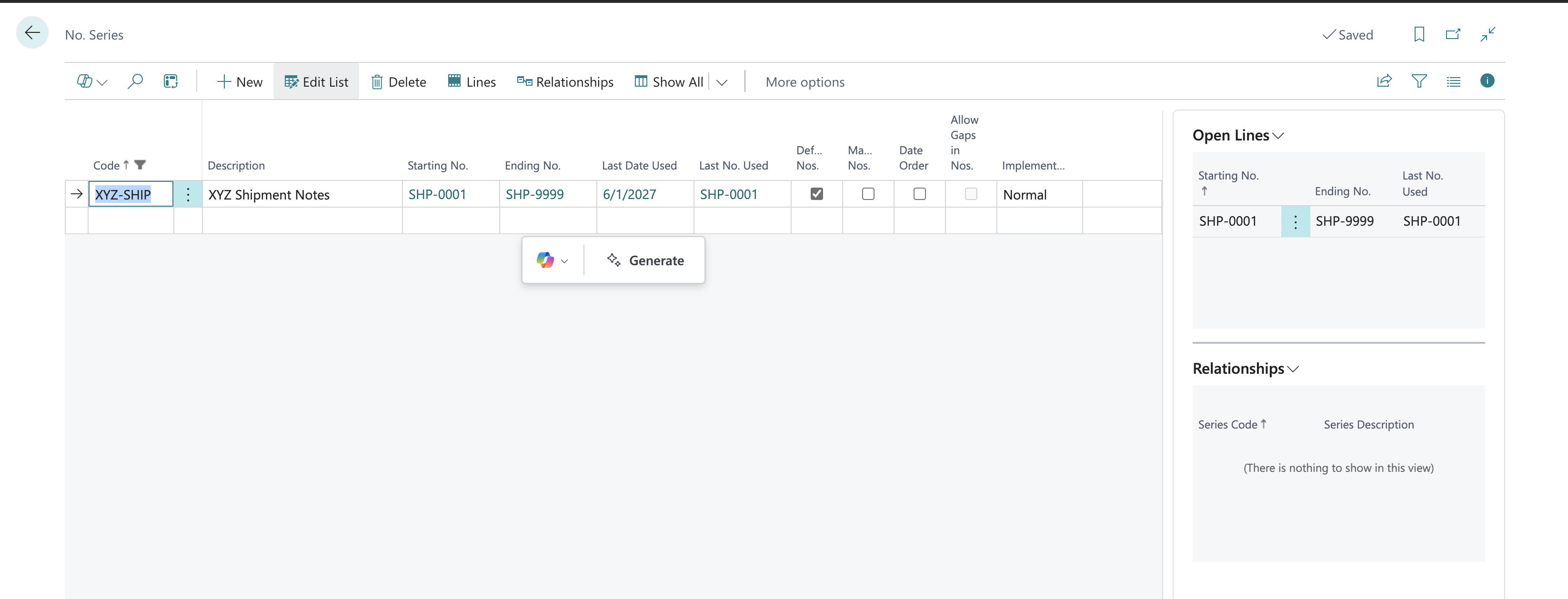
- Select or create a new Number Series (e.g., Code:
XYZ-SHIP, Starting No.:SHP-0001, Ending No.:SHP-9999, Default Nos.:Yes). - Assign
XYZ-SHIPto the setup field and close the page.
Step 2: Managing XYZ Shipment Notes
- Press Alt + Q and search for XYZ Shipment Notes.
- Click New to open the
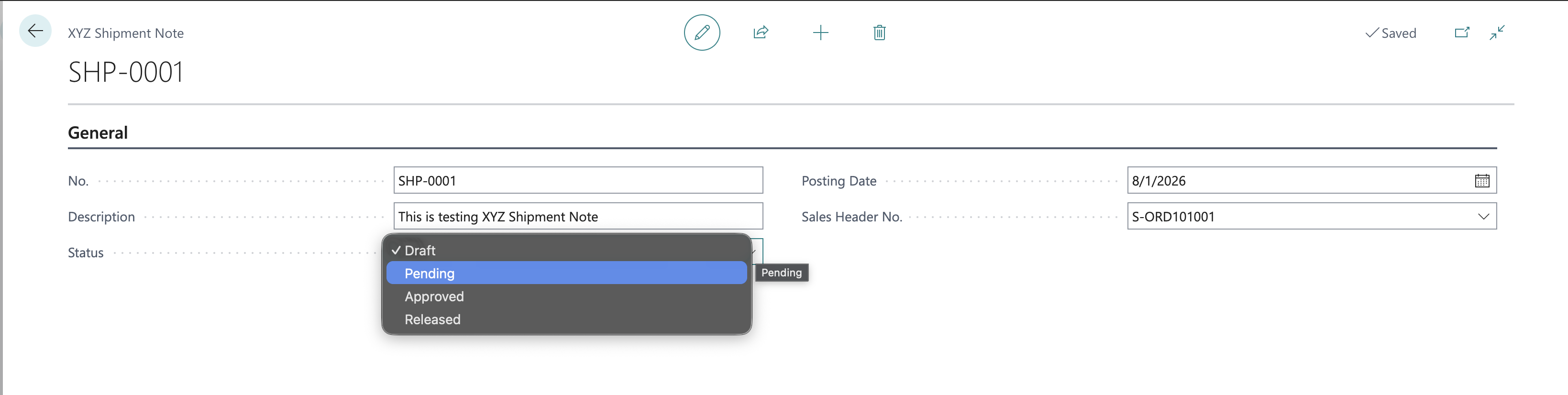
XYZ Shipment Note Card. - The No. field automatically populates from your configured number series (
SHP-0001). - Select a related Sales Order No., enter a description, and select a posting date.
- State Transition Test: Attempt to change the Status from
Draftdirectly toReleased. The system will throw the translatable error:"You cannot change the status directly from Draft to Released."
- Transition sequentially through
Draft→Pending→Approved→Released.

Step 3: Enforcing & Testing Sales Order Posting Interception
- Navigate to Sales Orders and open an existing active order.
- Under the General FastTab, locate XYZ Block Posting and switch it to
TRUE. - Click Posting → Post... (F9).
- Select Ship and Invoice and press OK.
- Result: The posting process is safely intercepted, presenting a clear error notification:
"Posting is blocked for Sales Order 101005."
- Toggle XYZ Block Posting off (
FALSE) to resume normal posting capabilities.
Conclusion & Key Developer Takeaways
Building extensions for Dynamics 365 Business Central Cloud demands a discipline of strict governance:
- Always use AppSourceCop: Enforce mandatory affixes (
XYZ) and clean ID allocations (70000000+). - Never hack standard objects: Utilize clean event subscriptions (
OnBeforePostSalesDoc) to extend standard behaviors safely. - Enforce business logic at the table layer: Embedding state machine rules in
OnValidate()ensures rules are honored regardless of which UI page or API triggers the edit. - Assert explicit error messages in tests: Avoid generic
asserterrorstatements; always verifyGetLastErrorText()matches expected labels.
About Data Daur
Data Daur specializes in enterprise Dynamics 365 Business Central development, AppSource extension engineering, and cloud architecture solutions.